Product photography can get very involved. Managing reflections, especially on shiny surfaces means you need to be very careful about that is in “sight” of the product surface. Glass is double trouble, as every piece of glass has 2 surfaces – inside and out. I’ve recently started to dabble in this and looked around for some ideas. 2 great places to go:- photigy.com and Karl Taylor Photography.
Category Archives: How Its made
Dancing Again
I keep coming back to this dance theme. There are a number of reasons. Dancers, especially classically trained dancers hold themselves with a certain grace and poise. (well “duh” I hear the rest of the world say, but well, yes it is obvious, however it is a reason why I’m attracted to dancers as subjects). Next is the movement element – showing movement in a still photograph, whether it be a dancer frozen in mid-leap –where it’s obvious they are moving as they had to be to get up there, to showing multiple positions or a constant motion blur in the image to show the path they have taken. I had shot with Gabby before, to produce a multiple flash image showing her path from stage right to stage left. This time I wanted to explore motion freezing, and getting some blur on.
Gabrielle Dams, my subject for this shoot is only 18 years of age, and yet she dances, she sings and teaches a dance class of12-13 year old girls – who all adore her. She’s very hard-working and always turns in a great performance.
When in Rome – er.. make like Scott and Kalebra Kelby :P
This is the exit from the gift shop in the Vatican Museum. Despite an abundance of staggeringly gorgeous old stuff, coming at you from every direction I really like this relatively modern stair case. I’ve been in the museum before, a few years back, however I walked right past this (I never go in the gift shop you see) and saw it on Kalebra’s Google+ post. Unlike Scott’s early morning visit, it was full of people when I shot it of course, and it took about 4 of the 20 or so shots I took to get an empty scene. This is easy to do in Photoshop these days – do you basic exposure adjustments to one image in Lightroom. Sync the others and then highlight them all and open as layers in Photoshop. Choose the one with the least people and put that at the bottom of the stack. Turn off visibility on all the others and then choose layers that have no people at the points where there *are* people on the base image. Turn these on and put a hide-all mask on them them so you can reveal parts of the image over the people on the base image – painting them away with a white brush.
The tour guide kept asking if I wanted a headset. Nope – I’ve heard the spiel before, and I can read up on Vatican history any time. The reason I was on a tour? It takes hours to get in the museum, however if you join a tour, you bypass the queues. They do get confused though when you don’t take the headset (and it’s one more thing to get in the way). The guide was waxing lyrical about the Sistine Chapel ceiling – so I nipped next door into the gift shop to take about 20 frames.
Taken with my new travel solution – another Scott Kelby tip: watch Scott’s travel photography video courses if you are contemplating any trips. For the first time in a long time, I carried no bag. I had my D800E, with Nikon 28-300mm super-zoom. I had my 20mm AIS and 50mm f/1.8 in my pockets. I used the 20mm twice the whole trip, and never touched the 50mm (which I took along in case I wanted a bit more light in dark places) as the low light performance on the D800 is so good, it just wasn’t worth putting the 50mm on.
I carried the camera on a Black Rapid sport strap – which worked very well – definitely recommend this strap – you shoot, you drop the camera back down – it all works very nicely.
Grey is the new Green
Light grey specifically. People used to shoot on a Chroma key green or blue background to make cutting out easier (by selecting everything that is *that* green is was easy to cut out the model for pasting onto something else). It is still popular in video work. For stills though, you don’t need to bother with that, as the selection and matting tools in Photoshop these days are very good. Using these green or blue background also reflects blue and green light onto your subject. You do still need to blend in your model and create shadows, and match the lights and so on.
However! Forget all that because if you shoot on a grey background you can just throw backgrounds on top and blend with overlay. Mask off the model and you’re done.
(Well ok there a few more steps but it’s certainly less tedious than the usual perfection-selection technique)
Shooting models
No – not people from agencies – little models of cars. Automotive shooters reckon you need a soft-box at least twice as big as the car to get great clean looking light on a car, which is basically a big convex shiny thing that reflects everything for miles around. Who has a 20 ft soft-box? hands-up? Nobody? Anyone get a car sized studio space with a diffusion panel under the roof? No? Continue reading
Classic beauty/cosmetics shot how-to
I always like to get a shot of every model using this set-up. Once you set it up, it’s so bullet proof, even I can do it without too much head scratching. Often called “clamshell lighting” as the lights resemble an open clam from the side, there are many variations on this lighting set-up, however they all have one light centred over the top of the model but angled more towards the horizontal, with another light or reflector below. You can then light the background from the front or the back.
Nah….
You can actually buy a thing called a “triflector” from Lastolite that has 3 panels that reflect from the bottom, left and right for a wraparound fill. I don’t use side reflectors – I find it makes the face look fat. In fact, I don’t use a reflector at all – I prefer to use a powered fill light, as I can then position it lower out of the way, and can have as much power in it as I like. I almost always use a small beauty dish directly overhead and centred, sometimes with the diffuser on, sometimes not – depends on how good the subject’s skin is: putting the diffuser on will smooth it out a bit by reducing the micro-shadows around any skin defects. For fill, I will use a softbox on a floor stand angled up just off horizontal – maybe 30 degrees. This is powered up to 1 stop below the main light.
Lighting-stock 4 – the HCCC studio-fest
Martin Pawlett and I have been organising these events for the past couple of years now for Holmes Chapel Camera club, and I guess, the first one was why I bought some studio lights in the first place. In past events, we’ve shot whoever turned up, and wanted to do that again. However as we also wanted to demonstrate some lighting, and I wanted to play around with some experimental stuff as well, we also hired some professional models to bolster the line-up. Martin hired Laura Norrey – a fantastic model who specialises in a vintage (40’s) look. I use PurplePort a lot for my model sourcing and it works very well. I put out a casting call for the day asking for “TF” models. “Time For…” or “TF” means models giving their time, in return for images for their portfolio. I got a number of responses, although may didn’t have transport and the venue we use is a little out of the way. Still, we got two models this way – Jade and Emma. I also then hired Bella Bibby via PurplePort for the lighting demos.
As the date approached, we had 3 of our TF models pull out (we didn’t get these via PP) so I looked around for some replacements. Bex at Body Couture did me a great deal and came down with Ellie Anderson making the numbers up to 7 models on the day. I also hired Amanda Hall of Visage-Design who did a great job on the make-up for the beauty shots.
Lower Withington Parish hall is brilliant for this. It is big, has a very high vaulted roof and a stage. It also has a lot of back rooms we can use for make-up and so on. Here’s a 180 degree panorama of the hall with 3 main lighting stages installed:-
That’s me in the middle shooting Emma Halloway in her very cool shiny PVC two-piece. On the left we have Anthony Holloway with Ellie Anderson and Bella is looking a bit forgotten on the right there. I’m sure Martin is just out of shot fixing something …. Continue reading
Crossing the streams
Ah um so this is another one the great wizard of photons – Mr Joe McNally casually did one afternoon (well that’s what it seemed like when it was edited together with a load of other shots in a Kelby Training video) and I just thought “oh yeah – I could do that” followed by “ah but…” and then “unless you…” and finally “I could do that”.

I’m talking about mixing ambient light with flash in a selective way – either outside, or using continuous lights. Normally, in the studio, I would start off by confirming I’d banished the ambient light so this was going to be interesting. Joe has a phenomenal shot in his portfolio shot in Beijing of a woman in traditional looking Chinese garb with lots of flowing patterned silks streaming out behind her in the wind. As it moves away from her, the fabric becomes more and more blurred from motion. Joe made this happen by lighting only the front of the model with flash, and adjusting the shutter speed to dial in the required amount of blur on the trailing silks that were hidden from the flash light. Continue reading
Sarah Rae
Been meaning to try out a Joel Grimes style high-key blown-out image for a while. I got a message from a local shooter – John Gannon, who’d recently built a studio – in his back garden, was busy teaching himself to shoot pictures and had a fantastic model – Sarah Rae from Bournemouth, at his studio all day. It just said – you’re local – fancy shooting with Sarah in my studio – just pay Sarah for her time. Well
– how could I refuse? It would seem rude! John’s back yard studio is a good size and he’s equipped it with basic lighting, a lot of backdrops, and even a little make-up station. Sarah showed up right on time with a massive wardrobe packed into 3 cases. She had been on tour in the North West for 3 weeks or so. I only intended to spend a couple of hours there, however Sarah has such a fantastical look – intense impressions, with an overwhelming sense of concentrated attention – and John’s a brilliant bloke – very generous, helpful and dead easy to get on with. I ended up spending 4 hours shooting with Sarah, and we got some great results.
So, first up was the Joel Grimes nuclear detonation light-everywhere shot. Joel uses some really big modifiers to provide fill left and right and a medium/large softbox to provide slightly more directional light from the front and centre. Go watch his videos on “Lit Up” – they’re really useful. I didn’t have 2 really big modifiers, however, the walls of John’s studio are all white, so I pointed both of his small softboxes at the left and right walls/pitched roof which had the perfect angle to reflect that light as a massive soft light source back onto Sarah. Continue reading
Back to the insect studio
Shot a lot of studio based images over the last year or more. That is, with controlled light, and human models. A while ago, I shot some images of flies in a studio set, with basic, “light all around” lighting, even underneath, courtesy of my Lee lens cap/diffuser stand for the insects. I was wondering how many other light set-ups would translate to the “small stage” and decided to try a classic 3 light set-up: 2 edge lights either side, plus one main light feathered away to give some nice shadows across the face.. er I mean outer wings..

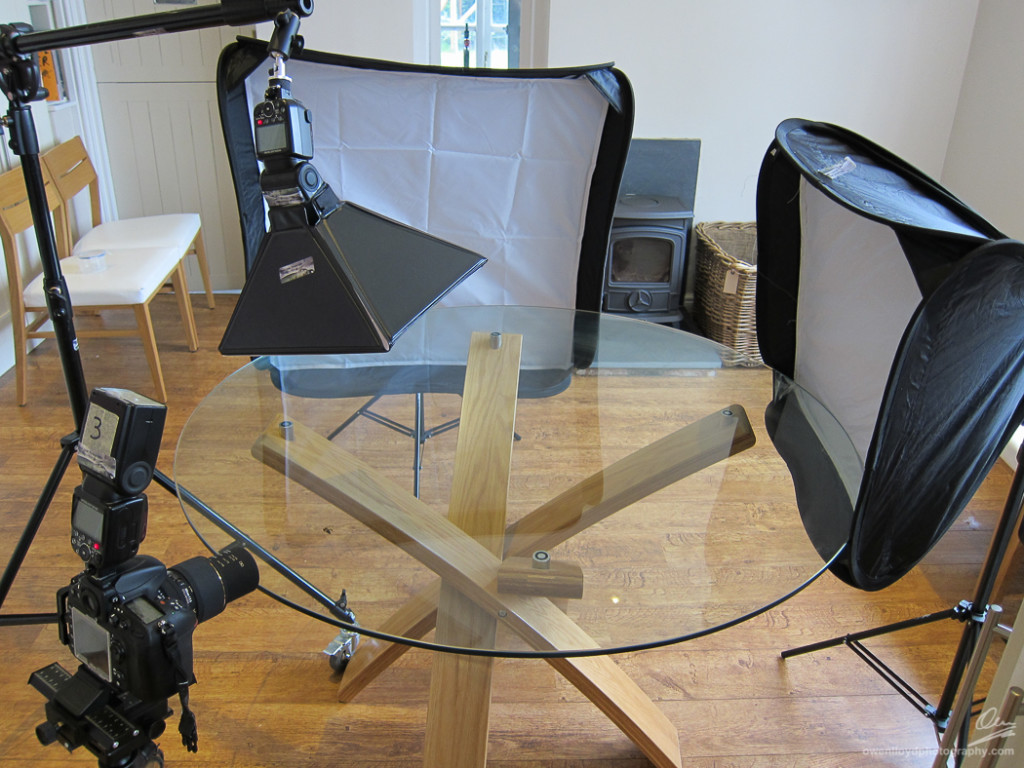
I had seen a similar set-up to the one below used to photograph insects. The general idea is to create a black strip down the glass between the soft boxes at the back, that will back-light the subject. Shoot really low and front-light the subject with a another soft-box overhead. The base (table in my case) should come out black as light not hitting the subject should pass through the glass.
The set-up you can see to the left was made using these items:-
- 2 x MKStudio soft-boxes for Speedlights on 2 lightweight stands
- A Lumiquest LTP soft-box for the main light
- 3 x SB-900 Speedlights
- Another SB-900 used as the commander.
- Sigma 105mm macro lens
- D800E
- Heavy duty boom stand
- Glass table
- The HTPhoto dual axis macro rail and tripod was quickly abandoned when it became apparent I would have to chase the live subject about …. Continue reading